Browser workspace
Use Autohand Dev
Start a private coding conversation in the browser, bring the relevant repository or files, choose how the task should run, and review every material change before accepting it.
Sign in and start clean
- Open dev.autohand.ai/new.
- Sign in with the same Autohand identity you use in Console.
- If an account selector appears, choose the account that owns the repository or workflow you intend to use.
- Select New chat when you want a fresh task rather than continuing unrelated context.
The sidebar contains your own workspace history. You can hide it before presenting or capturing the composer so private conversation titles are not shared accidentally.
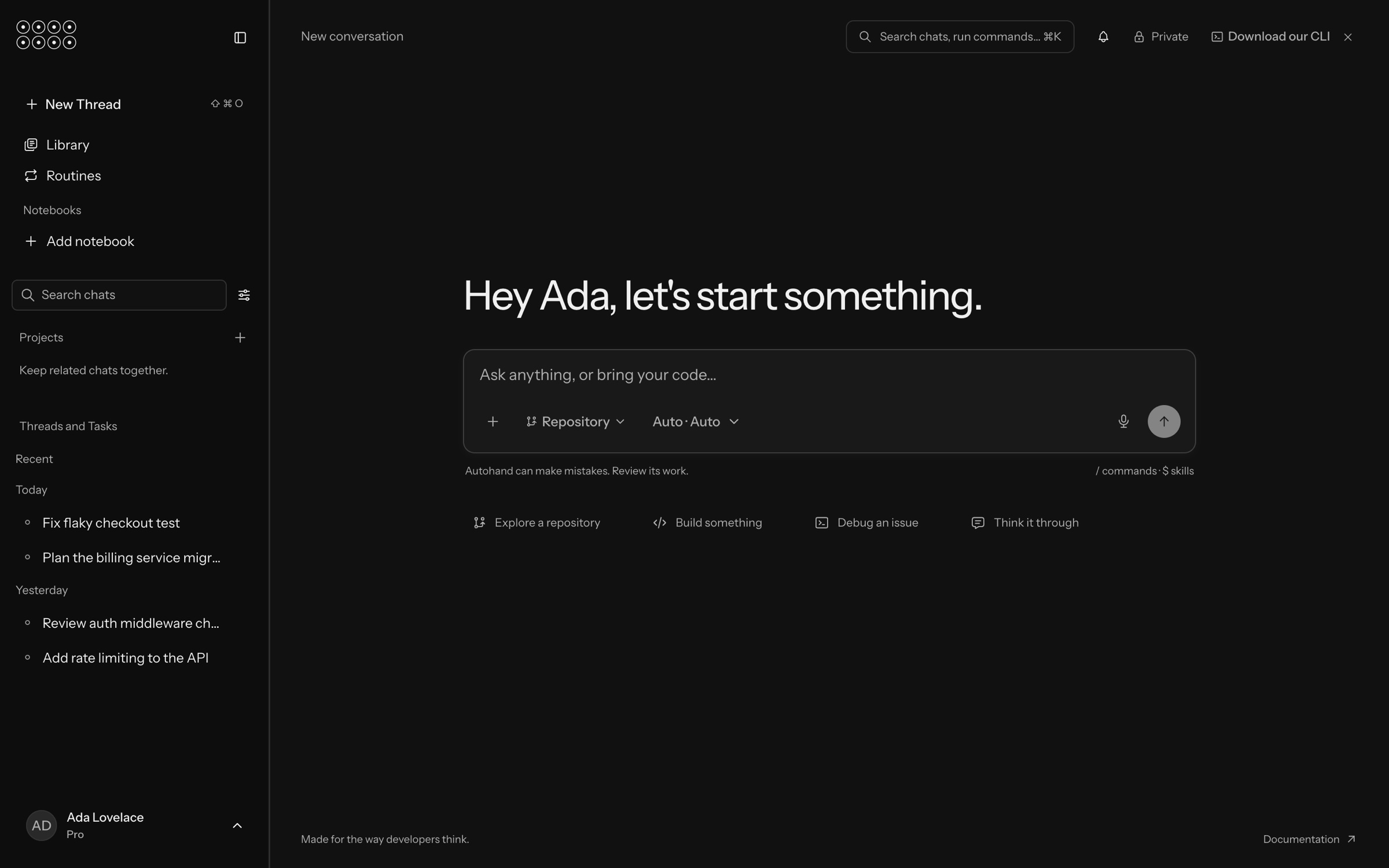
- Add
Attach only the files or tools needed for this task.
- Repository
Select the code context the agent should inspect before it makes claims or changes.
- Run with
Keep automatic selection or choose the available model and mode that match the task.
- Send
Submit the task after its outcome, boundaries, and verification are explicit.
Run your first repository task
- Choose context. Select Repository and make sure the intended project is active. Add a file only when it contains evidence the repository does not already provide.
- State the outcome. Describe the user-visible or technical result, not only a list of edits.
- Name the boundary. Say which repository, package, files, data, or environment are in scope and what must remain untouched.
- Define proof. Include the command, test, page, performance target, or review checkpoint that decides whether the work is complete.
- Send and review. Watch the evidence and proposed actions. Confirm before any destructive, external, or production action that requires your authority.
In the selected repository, fix the settings form so validation errors stay
next to their fields on mobile.

Preserve the current API contract and unrelated work. Verify the focused unit
tests, the existing build, and the form at 390 px and desktop widths. Report
anything that still needs a production or account-level check.
Use commands and skills deliberately
The composer advertises two shortcuts:
- Type
/to discover commands available in the current Dev session. - Type
$to discover skills available to the agent.
Select a command or skill only when it matches the task. A skill can add a specialized workflow, but it does not broaden permissions or replace your review of external effects.
Review, continue, and hand off
- Ask for file paths, line references, command output, and the exact proof boundary when a result is hard to verify.
- Keep one conversation focused on one outcome. Start a new chat when the next task needs a different repository or decision history.
- Before leaving, ask for a compact handoff containing the outcome, changed files, validation, remaining risks, and the next safe action.
- Use Console for account, billing, API-key, usage, and client management. Use Dev for the coding conversation itself.
Three useful starting prompts
Explore
Map the entry points for [feature]. Trace one real request from UI to storage.
Do not change files. Cite the paths you inspected and list unresolved questions.
Debug
Reproduce [observed failure] at its production seam. Rank hypotheses using the
available evidence, then implement the smallest compatible fix and run [checks].
Build
Add [outcome] within [scope]. Preserve [contracts and unrelated work]. The work
is complete when [tests], [build], and [rendered or runtime behavior] pass.
Completion checkpoint
You are ready to work when Dev shows the intended account, repository context, and run mode; the prompt states an outcome and proof; and you understand which actions still need confirmation. If sign-in, account selection, or access is wrong, fix it in Console Account before continuing.